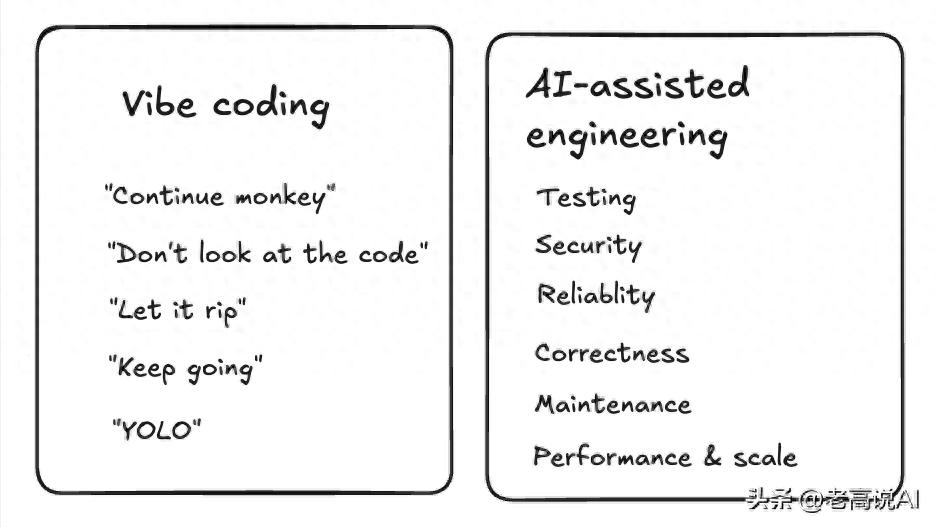
I want to share a real experience. Last week, I used AI to write a feature from scratch, and it took about 5 minutes to get it running. The interface was there, the interactions were in place, and the data flow seemed correct. My feeling at that moment was—this is amazing.
Then I spent two whole days fixing the issues left by the AI.
It wasn’t that the technology was inadequate. I just trusted it too much.
A Google engineer named Addy Osmani, with 25 years of experience, recently wrote an article titled “Beyond Vibe Coding,” specifically discussing this issue. After reading it, I thought—if I had seen this article earlier, I wouldn’t have wasted those two days last week.
Vibe Coding: Sounds Great, Feels Painful
First, let’s introduce the concept of Vibe Coding.
This term was coined by Andrej Karpathy to describe a very “casual” coding style. You provide AI with a vague requirement, and it gives you a bunch of code that you run without looking, focusing on the overall feel rather than implementation details. Karpathy’s original words were:
“I just look, talk, run code, copy and paste, and then it works.”
—— Andrej Karpathy

“Vibe Coding: A Cognitive Reconstruction in the AI Programming Era”—the double-edged sword of casual programming.
Sounds wonderful, right?
Addy calculated the cost using a formula:

Using Vibe Coding, you can complete 70% of the functionality in 5 minutes. But the remaining 30% can take you three days of frustration.
What does this 30% consist of?
Fixing one bug might introduce three new bugs. Without engineering knowledge, the code is impossible to maintain. The more you change, the more painful it becomes because you don’t know what you’re modifying. If you’re lucky, it might work in the end; if not, you might have to start over.
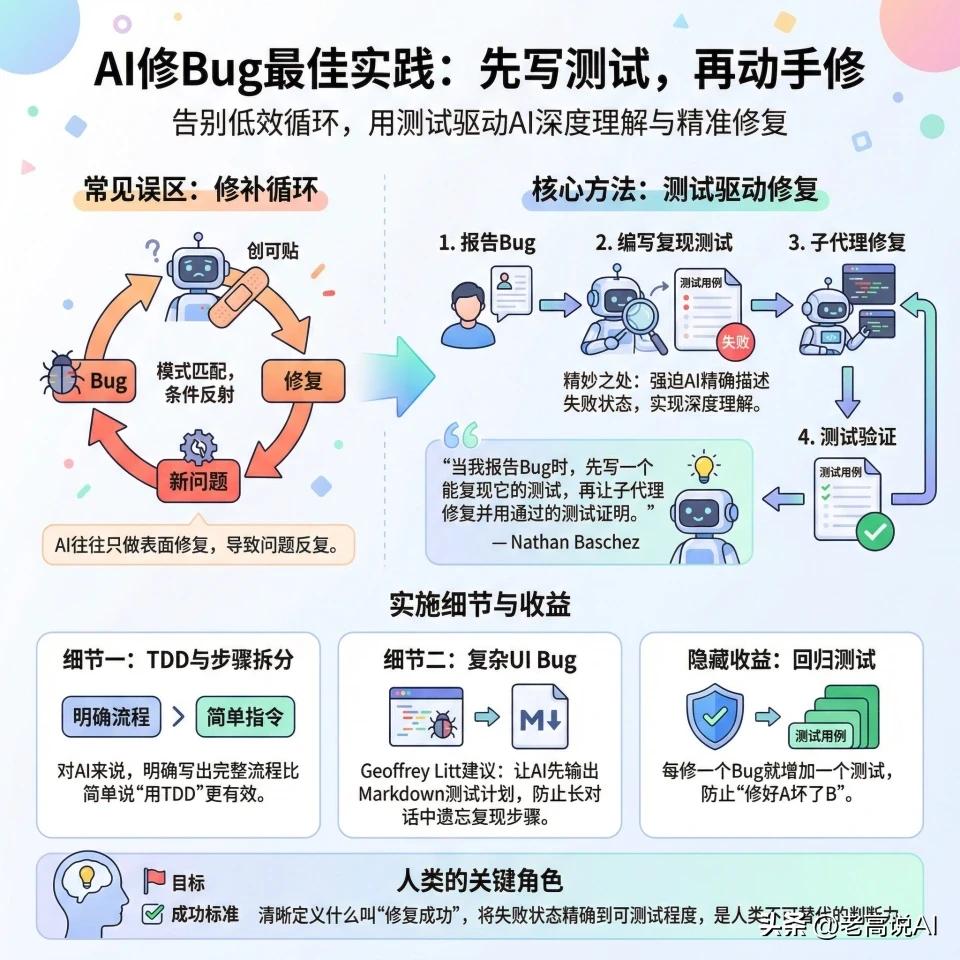
Best practices for AI bug fixing—write tests first, then fix, to break the inefficient cycle.
I’m not saying Vibe Coding is bad. When is it suitable?
Quick validation, personal projects, or creating a demo for fun. But if you want to truly launch something for real users, Vibe Coding is a shortcut to disaster.
The Four Biggest Pitfalls: How Many Have You Encountered?
Pitfall 1: Letting AI Write Code Right Away
Most people, when faced with a requirement, immediately throw it at AI—“Help me create a Todo app.” AI churns out code quickly, and you think—wow, that was fast. However, AI will often provide an overly complex solution.
✅ Correct approach: First, let it plan, then let it implement. Use “Plan Mode” to generate an architectural plan, starting from the simplest version, then choose a direction to proceed.
Pitfall 2: Not Providing Documentation for AI
Many models have knowledge cutoffs. For example, it may only know Tailwind v3 while v4 has already been released. If you write code using outdated APIs, it may not run, and you won’t know why.
✅ Correct approach: Feed the official documentation to AI. This isn’t redundant; it’s helping AI help you.
Pitfall 3: Describing UI in Pure Text
A picture is worth a thousand words. When asking AI to implement a design or fix a bug, provide a screenshot directly. Current AI programming tools support importing designs from Figma, adding images to prompts, and including real-time browser screenshots.
✅ Correct approach: If you can screenshot, do it; don’t describe it in text. Visual information is 100 times more accurate than text descriptions.
Pitfall 4: Being Lazy with Testing
No matter how smart AI is, it will eventually break your application. Run it on localhost after every update, and check the browser console for errors. Small-step testing can help avoid a nightmare of debugging.
✅ Correct approach: Don’t wait until launch to discover issues. Run the code locally after every AI generation and check the console for errors.
Five Prompt Engineering Principles to Make AI Truly Work for You
1. Provide Sufficient Context
Always assume AI knows nothing about your project. If you ask, “Why isn’t my code working?” it can only guess. Tell it, “This React hooks function should update user data on form submission, but it throws an error: Cannot read property name of undefined,” so it can provide precise solutions.
2. Be Clear About Your Goals
Vague questions yield vague answers. Clearly state the expected behavior, the current erroneous behavior, any constraints, and the desired output format. The more specific, the more accurate.
3. Break Down Complex Tasks
Divide large problems into smaller parts and tackle them step by step. For instance, when building a user authentication system, first design the database schema, then create the registration interface, implement password hashing, and finally add JWT verification. Let AI complete each independent unit.
4. Provide Input and Output Examples
Use specific examples to reduce ambiguity. When you say, “Create a function to format currency,” provide three examples—formatCurrency(2.5) should return $2.50, formatCurrency(1000) should return $1,000.00—so AI understands immediately.
5. Use Roles and Personas
Having AI play a specific role can change the quality of the responses. Asking it, “Review my code for potential bugs as a senior React developer,” yields different insights than simply asking, “What’s wrong with this code?”
Four Iron Rules for Producing Code
Iron Rule 1: Always Review AI-Generated Code
- Treat AI-generated code as if written by a junior developer.
- Check for security vulnerabilities, error handling, performance impacts, and maintainability standards, one by one.
- Don’t skip reviewing just because it looks correct.
Iron Rule 2: Have a Complete Testing Strategy
- AI can help generate tests, but you must verify coverage and quality.
- Cover valid credentials, invalid credentials, network errors, malformed inputs, boundary cases, and security scenarios.
- Use your judgment to check for any missed cases.
Iron Rule 3: Security First
- AI may introduce security vulnerabilities, that’s a fact.
- Input validation and sanitization, SQL injection protection, XSS protection, sensitive data handling, API key management—each must be reviewed.
- Don’t skip this step, no matter how tedious it seems.
Iron Rule 4: Focus on Performance and Scalability
- AI may generate code that “works” but is inefficient.
- Clearly inform it—this table has over 1 million records, consider indexing strategies, query execution plans, and memory usage.
- Ensure these factors are considered during code writing.
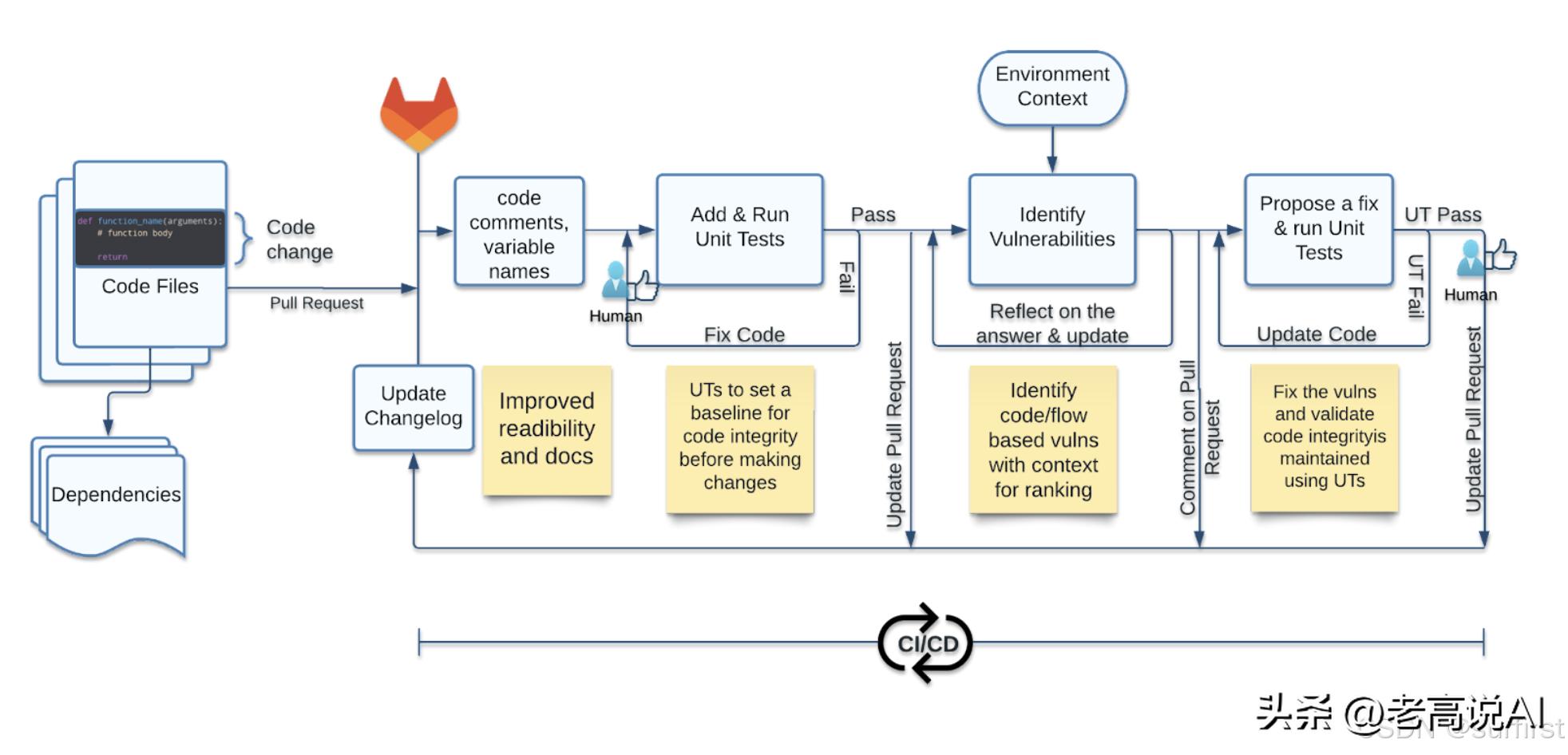
AI code review process—Comment Generation + Data Flywheel, continuously improving code quality.
Future Workflow: An AI Team with Distinct Roles
At the end of the article, one statement left a deep impression on me. Addy mentioned that the complete workflow for AI-assisted development in the future should look like this:
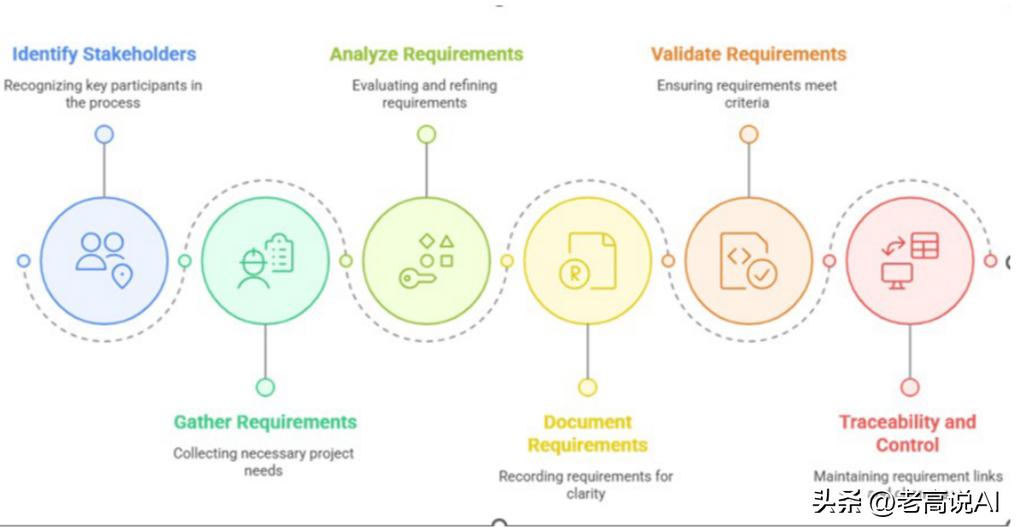
AI-Assisted Engineering—complete workflow from requirements analysis to validation control.
You describe what you want in natural language, and AI understands the context, requirements, and constraints. Then AI generates a detailed technical plan, considers architectural decisions, and suggests optimal implementation strategies. Next, the AI agent implements functionality across multiple files, handles integration, and generates complete tests. Then AI conducts code reviews, provides security analysis, and performance optimization suggestions. Finally, AI helps you deploy, monitor performance, and offer optimization advice.
What’s interesting about this statement?
Each “AI” mentioned should not be the same AI.
The planner, the coder, the reviewer, and the deployer should each have distinct roles. Just as a company cannot function with only programmers and no product managers, AI programming cannot rely on a single agent to handle everything from start to finish.
20 AI programming tools compared comprehensively—terminal CLI, AI editors, VSCode plugins, web applications.
Vibe Coding vs AI-Assisted Engineering: Which Will You Choose?
Honestly, you might think these principles are common sense. But common sense needs to be emphasized repeatedly because we often bypass it in practice.
I am guilty of this myself. I know I should plan before coding, but in excitement, I directly throw it at AI. I know I should test, but when I see it running, I think, “It should be fine.” Then the problems arise.
Addy’s article helped me organize these common sense principles into a system, a checklist to follow.
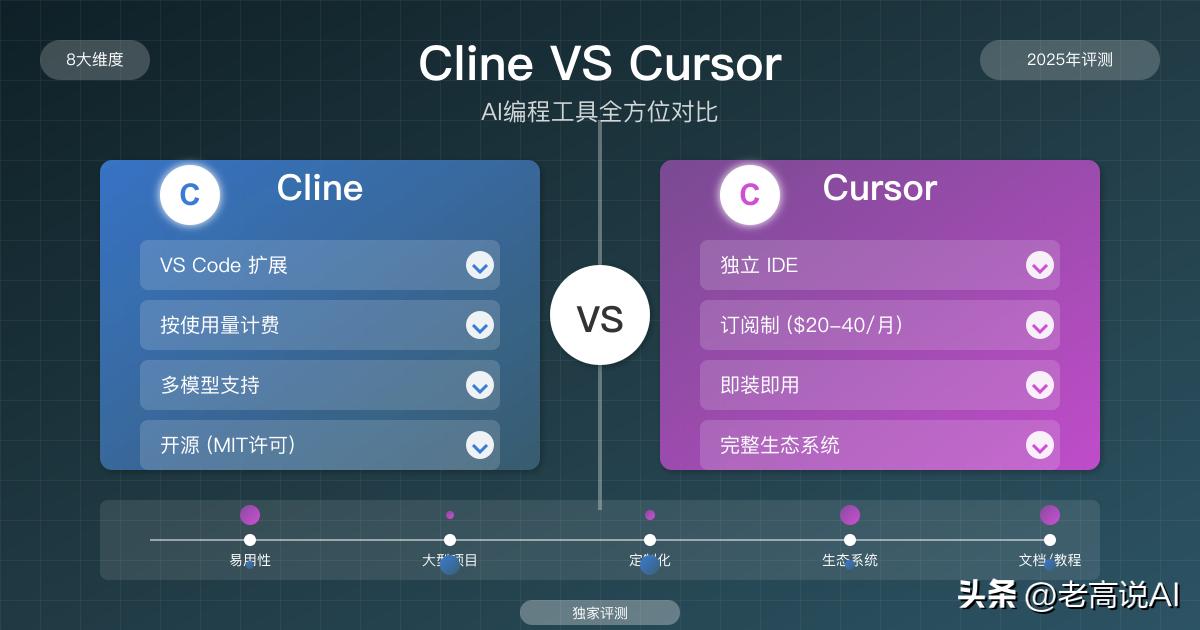
Cline vs Cursor—comprehensive comparison of AI programming tools, choosing the right tool makes a big difference.
If you are also using AI to write code, you might want to bookmark this. Not every principle needs to be strictly followed, but at least next time before asking AI for help, take three seconds to think:
Is this Vibe Coding or AI-Assisted Engineering?
The former gets you 70% done in 5 minutes, while the remaining 30% can drive you to despair for 3 days. The latter may take a bit longer and be steadier, but in the end, you will have a real product ready for launch.
What will you choose, friends? Let’s discuss in the comments!
Comments
Discussion is powered by Giscus (GitHub Discussions). Add
repo,repoID,category, andcategoryIDunder[params.comments.giscus]inhugo.tomlusing the values from the Giscus setup tool.